Marker icons and colors in a Bases map
Every note can carry its own icon and its own color on a map. This page shows where to set them, which icon names draw something, and what to check when a marker does not look right.
Marker icon and Marker color are Obsidian’s own map options. They work whether or not Advanced Maps is installed, and installing it changes nothing about how you set them. Obsidian ships a worked example of the basics in the Maps plugin’s example vault.
Where the options live
Section titled “Where the options live”Open a Base, switch to its map view, click the view name, and open Markers. A Base is an Obsidian file that collects notes and files you filter for, and shows them as a table or a map.
Both options take a property, not a literal value. Any note property or Base formula works, as long as its value reads as plain text. Note properties come from frontmatter, the properties block at the top of a note.
| Option | Give it | It expects |
|---|---|---|
| Marker icon | a property such as note.icon or formula.My icon |
the name of an icon from Lucide, the icon set Obsidian’s markers use — Lucide library |
| Marker color | a property such as note.color |
any CSS color value |
A note with neither property still gets a marker: a small dot on a circle filled
with --bases-map-marker-background, the map’s default marker color.
Icon names that render, and names that go blank
Section titled “Icon names that render, and names that go blank”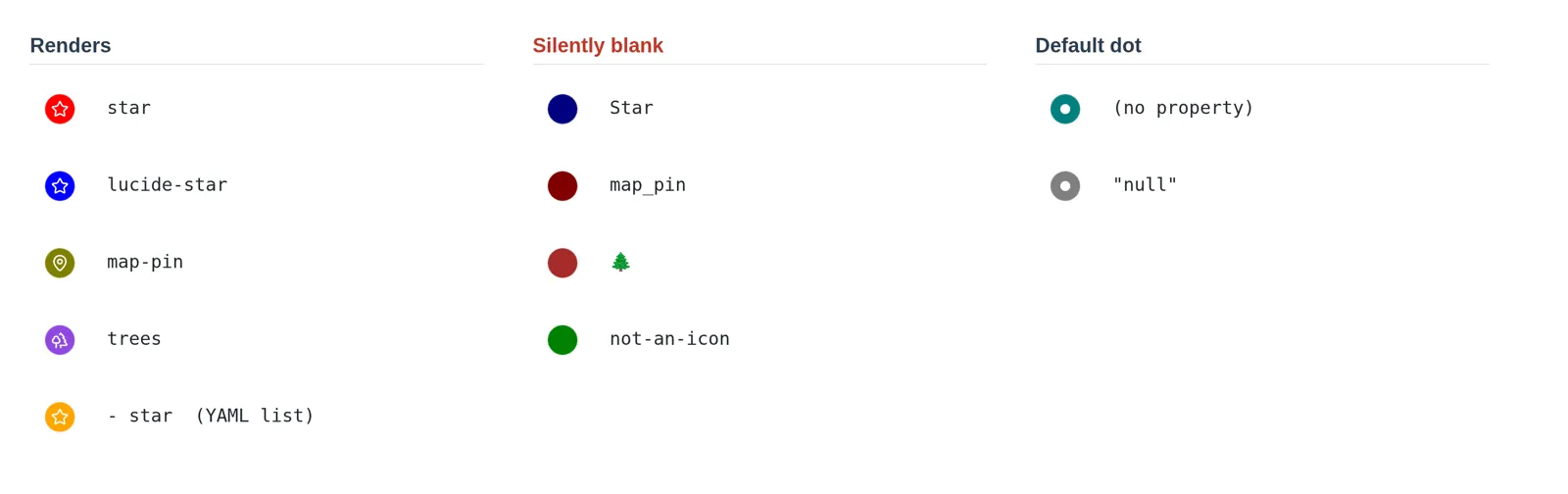
| Value in the property | What you get |
|---|---|
star |
the Lucide star icon |
lucide-star |
the same icon — the lucide- prefix is accepted |
map-pin |
the Lucide map-pin icon |
a YAML list whose one item is star |
the star icon — a single-item list reads as its own text |
Star |
filled circle with no icon — names are case-sensitive |
map_pin |
filled circle with no icon — Lucide separates words with -, never _ |
🌲 |
filled circle with no icon — emoji are not icon names |
| any name Lucide does not have | filled circle with no icon |
| the property is absent or empty | the default dot |
the literal text null or undefined |
the default dot |
A filled circle with no icon points to a misspelled name. A dot means the value is missing. The marker tells you which one to check.
Colors
Section titled “Colors”Marker color is passed to CSS untouched, so every form CSS understands works:
color: redcolor: '#e03131'color: rgb(224 49 49)color: var(--color-purple)A var() color is resolved against the current theme, so it follows light and
dark mode by itself. Obsidian’s own accent and color variables are the easiest
way to stay consistent with the rest of the app.
The glyph inside the marker is not per-note. Every icon is drawn in
--bases-map-marker-icon-color, one value for the whole map, which a CSS snippet
can restyle:
.workspace-leaf-content[data-type='bases'] { --bases-map-marker-icon-color: #fff8e7;}Driving both from a formula
Section titled “Driving both from a formula”A Base formula is a small expression that gives every note a value it does not store. A formula gives every note an icon without any note storing one, which is why these options take a property rather than a value.
Decide from another property:
if(note.rating >= 4, "star", "circle")Inherit from a linked note, so that changing one type note restyles every marker that points at it:
list(type)[0].asFile().properties.icon;Then select the formula as the property. In the .base file it reads:
formulas: Rated icon: if(note.rating >= 4, "star", "circle")views: - type: map name: Map coordinates: note.coordinates markerIcon: formula.Rated icon markerColor: note.colorSome notes may already carry Star or an emoji. A formula that maps those values
onto real Lucide names fixes every marker at once, and no note has to be edited.
With Advanced Maps installed
Section titled “With Advanced Maps installed”Advanced Maps adds layers to the native map; native markers stay as they are. Your icons and colors are drawn by Obsidian exactly as configured. Two interactions are worth knowing:
- Note markers that would overlap are fanned out into rings, and each one keeps its own icon and color. The spread is a screen-space offset — a marker’s stored coordinate never changes, and Fan out overlapping pins turns it off. See Around views and navigation.
- Photo thumbnails and track lines are separate layers, so a Base holding notes, photos and a GPX file shows all three without your markers changing.
When a marker looks wrong
Section titled “When a marker looks wrong”| Symptom | Cause |
|---|---|
| Filled circle, nothing inside | The icon name is not a Lucide name. Check case and - versus _. |
| A dot where you expected an icon | The property is empty for that note, or resolves to null. |
| Every marker is the same color | Marker color is unset, so the map’s default is used for all of them. |
| A flat near-black or near-white marker | The color value is not valid CSS, so it resolved to the theme text color. |
| Nothing changed after editing a note | The property is set but not selected under Markers. |